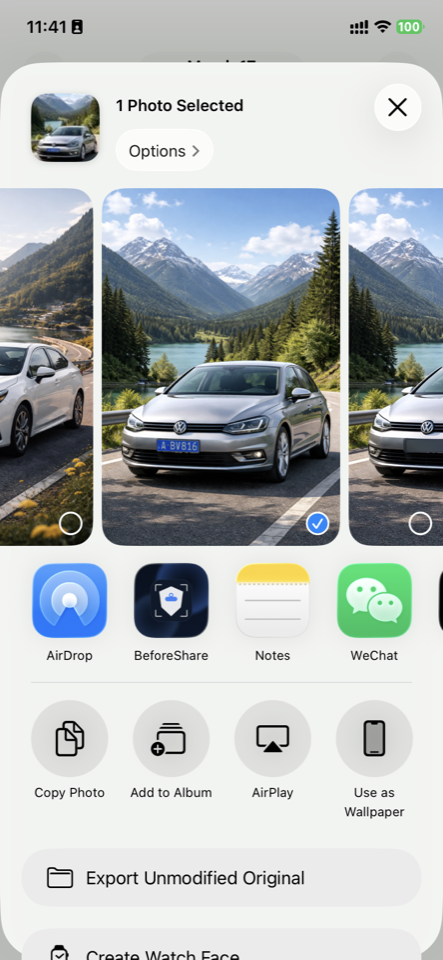
Choose a photo and tap Share
You keep the habit you already have. When you are ready to send, open BeforeShare directly from the iPhone share sheet.
Check before you send
License plates, location clues, QR codes, and personal details can travel with a single image. BeforeShare checks your photo right from the iPhone share sheet, before you hit send.
People are not looking for another editing tool. They are about to share a photo and want to know whether it is leaking private information.
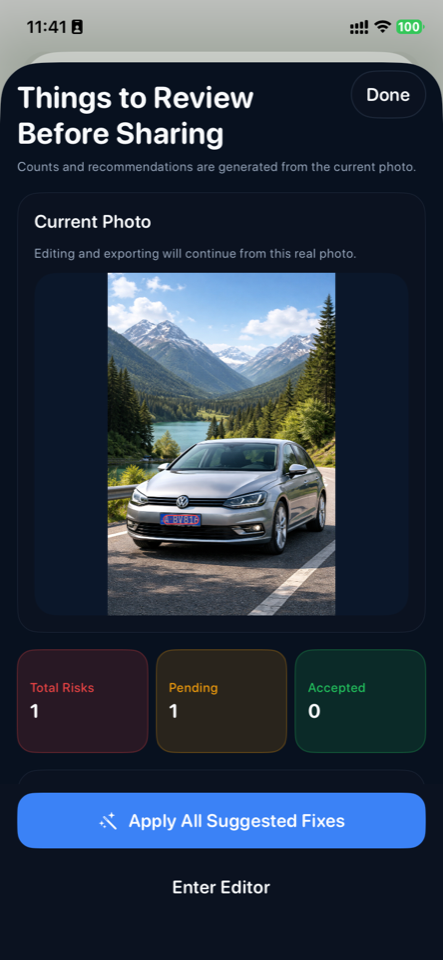
Before you tap send, the check is already done.
Instant demo
Pick a photo, tap Share, choose BeforeShare. It scans for issues immediately, so you can review privacy risks before the image actually goes out.
You keep the habit you already have. When you are ready to send, open BeforeShare directly from the iPhone share sheet.
License plates, location clues, QR codes, and contact details are flagged so you can tell, immediately, when a photo should not be shared as-is.
Handle everything in one tap or review items one by one. It takes seconds, and the problem stays on your phone instead of in someone else's inbox.

Before you tap send, we have already checked the photo for you.
The risk
In reality, a single image can reveal more than intended, and once it is sent, you do not get that exposure back.
Once it is sent to a group chat, social feed, or marketplace listing, you no longer control where that image travels next.
What is visible in the frame, combined with EXIF metadata, can tell strangers more about your location than you intended.
Invite links, tickets, payment codes, or internal group QR codes are easy to overlook and even easier to spread.
They may not jump out at first glance, which is exactly why people notice them only after the photo is already gone.
The fix
BeforeShare detects privacy risks before you share and gives you quick ways to fix them. No app switching. No new workflow. No sending photos to the cloud.
The conversion point
BeforeShare appears in the iPhone share menu and works at the moment you are actually preparing to send the photo.
There is no new flow to learn. It simply adds a privacy check to the action people are already taking.
Fix everything in one tap, or review each item manually. Either way, the whole process takes seconds.
Trust
Your photos are not uploaded. Your privacy does not leave your phone. BeforeShare stops problems before the image goes out instead of sending your photo somewhere else for review.
Questions
These are the objections and uncertainties most people have right before they decide whether to trust a photo privacy tool.
No. BeforeShare scans and processes photos on your device. Your images are not uploaded for cloud review.
No. BeforeShare is available from the iPhone share sheet, so you can run it when you are already about to send the photo.
BeforeShare helps flag license plates, QR codes, contact details, and other privacy-sensitive content before you share.
No. You can handle everything in one tap or review items one by one, and the full flow usually takes just a few seconds.
Ready to use it?
Keep your normal sharing flow. Add a privacy check right before send.

Download now